

MCP connector documentation
Anida Clinical Trials for Claude and ChatGPT
Anida Clinical Trials brings Anida, our AI agent, into Claude and ChatGPT. Describe a condition and Anida pre-screens you against thousands of recruiting clinical trials in minutes, shows you the studies you may qualify for near you, and connects you with the research site — without leaving the chat.
It is free for patients and participants, and for clinicians looking for cutting-edge research studies for their patients. It works in whatever language you are chatting in — over 50 languages are supported.
What it does
- Searches thousands of recruiting studies for your condition in real time and uses your ZIP code or city to find the research sites around you.
- Tells you what a research site or clinic near you is running. Name the hospital, research center or clinic and the condition you are interested in, and Anida lists the studies it is enrolling for.
- Looks up any study by its NCT number. Give the number from ClinicalTrials.gov and Anida explains the study in plain language and can pre-screen you for it.
- Pre-screens you against each study’s actual eligibility criteria with questions tailored to you. Answer yes, no, or “Not sure” for anything you do not know.
- Explains any question in plain language when a medical term is unfamiliar.
- Connects you with the research site you choose through a private signup link.
Example prompts
For patients and caregivers
- “Nothing is working for my type 2 diabetes anymore. Are there any research studies I could join?”
- “My mom has Alzheimer’s disease. Are there any research studies for Alzheimer’s in Dallas, TX she may be eligible for?”
- “I’m 52 and live in 11209. I was diagnosed with rheumatoid arthritis in 2019 and methotrexate is not controlling it. Are there studies near me I might qualify for?”
- “Are there any dementia clinical trials at Mayo Clinic?”
- “What is this study NCT06775379 about?”
Describe your condition in your own words — what you have been diagnosed with, what you have tried, and where you live. Anida runs the search and asks only the questions it still needs to narrow down the best possible matches for you.
Using your chat history
If you have already talked about your health with your assistant, you can simply ask it to find trials for you. The assistant writes a de-identified summary of what it knows and Anida builds on it, so you are not asked what you have already said.
- “@Anida Clinical Trials based on my health history, could you find clinical trials I may qualify for?”
- “Claude, based on what you know about my health, use Anida Clinical Trials to find research studies near me.”
- “ChatGPT, using my health history from our chats, are there any clinical trials I could join?”
For clinicians
- “I’m an oncologist. My patient is a 64-year-old man with metastatic castration-resistant prostate cancer, progressed on abiraterone, ECOG 1, near Brooklyn NY 11209. Any trials for him?”
- “Find studies my patient may qualify for: 58-year-old woman, heart failure with reduced ejection fraction (EF 30%), NYHA class III on sacubitril/valsartan and a beta blocker, eGFR 55, Houston area.”
You can also paste a de-identified clinical note. Anida builds its pre-screening on the history you provide instead of re-asking it, and asks clinician-level questions for what is still missing. Leave out names, dates of birth and contact details; any identifiers that slip through are removed on our side before anything is stored.
Calling Anida directly
You do not need special wording — asking about clinical trials or research studies is enough. To call it explicitly, in ChatGPT type @Anida Clinical Trials followed by your question:
- “@Anida Clinical Trials any lupus studies near Atlanta?”
In Claude, ask it to use the Anida Clinical Trials connector:
- “Use Anida Clinical Trials to find lupus studies near Atlanta.”
Setup
No account or login is needed, and there is nothing to configure.
- Claude: open Settings → Connectors, search for Anida Clinical Trials in the directory and click Connect.
- ChatGPT: open the apps directory, search for Anida Clinical Trials and click Connect.
To add it manually as a custom connector (Claude Desktop, Claude.ai custom connectors, or any MCP-compatible client), use this server URL with no authentication:
https://mcp.anidatrials.com/How the flow works
- Tell Anida about the condition. Mention it in the chat, along with your ZIP code or city if you like. If anything essential is missing, Anida asks up to three quick setup questions: your age, where you are located, and how far you would travel for study visits. This finds studies near you — it does not identify you.
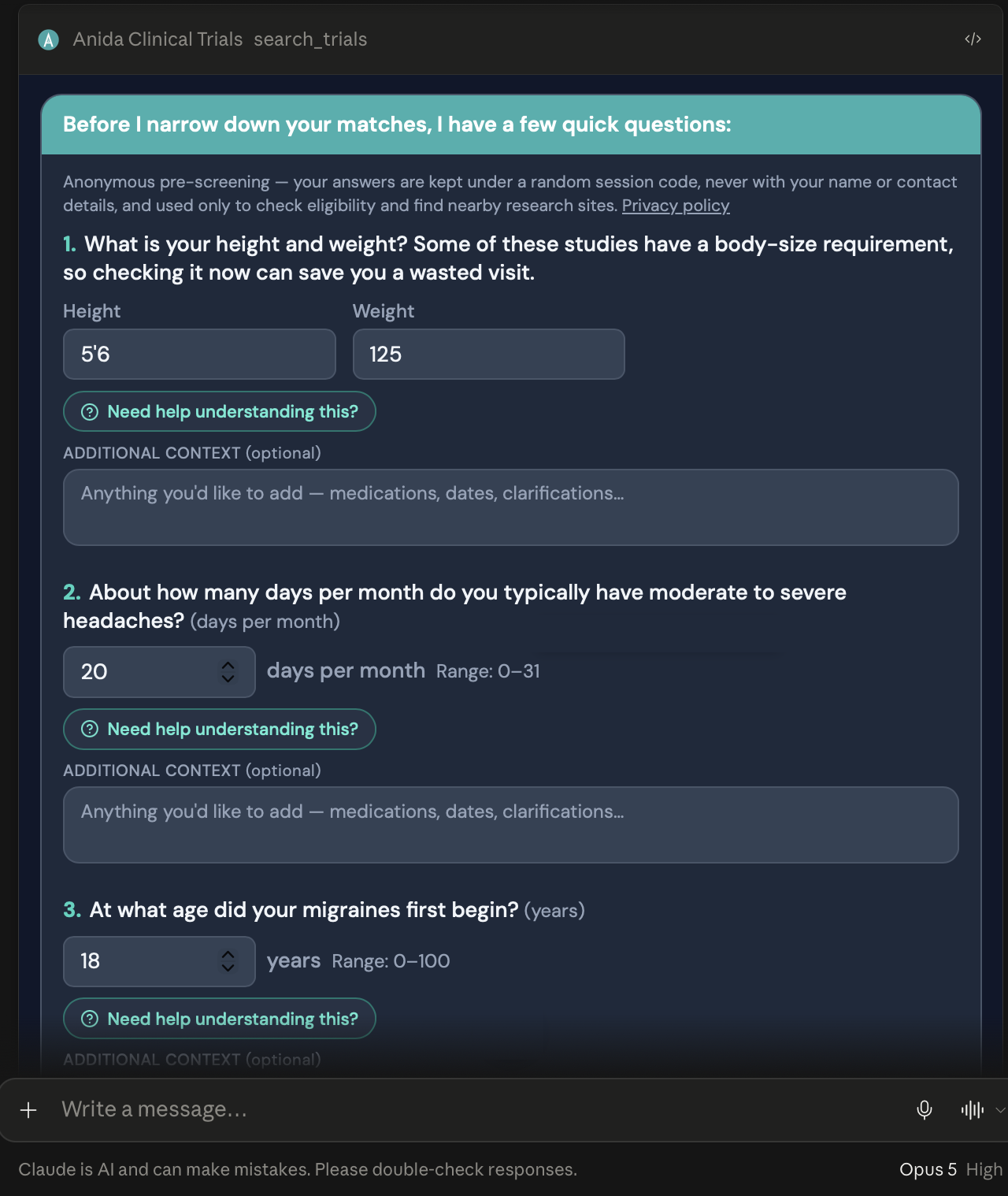
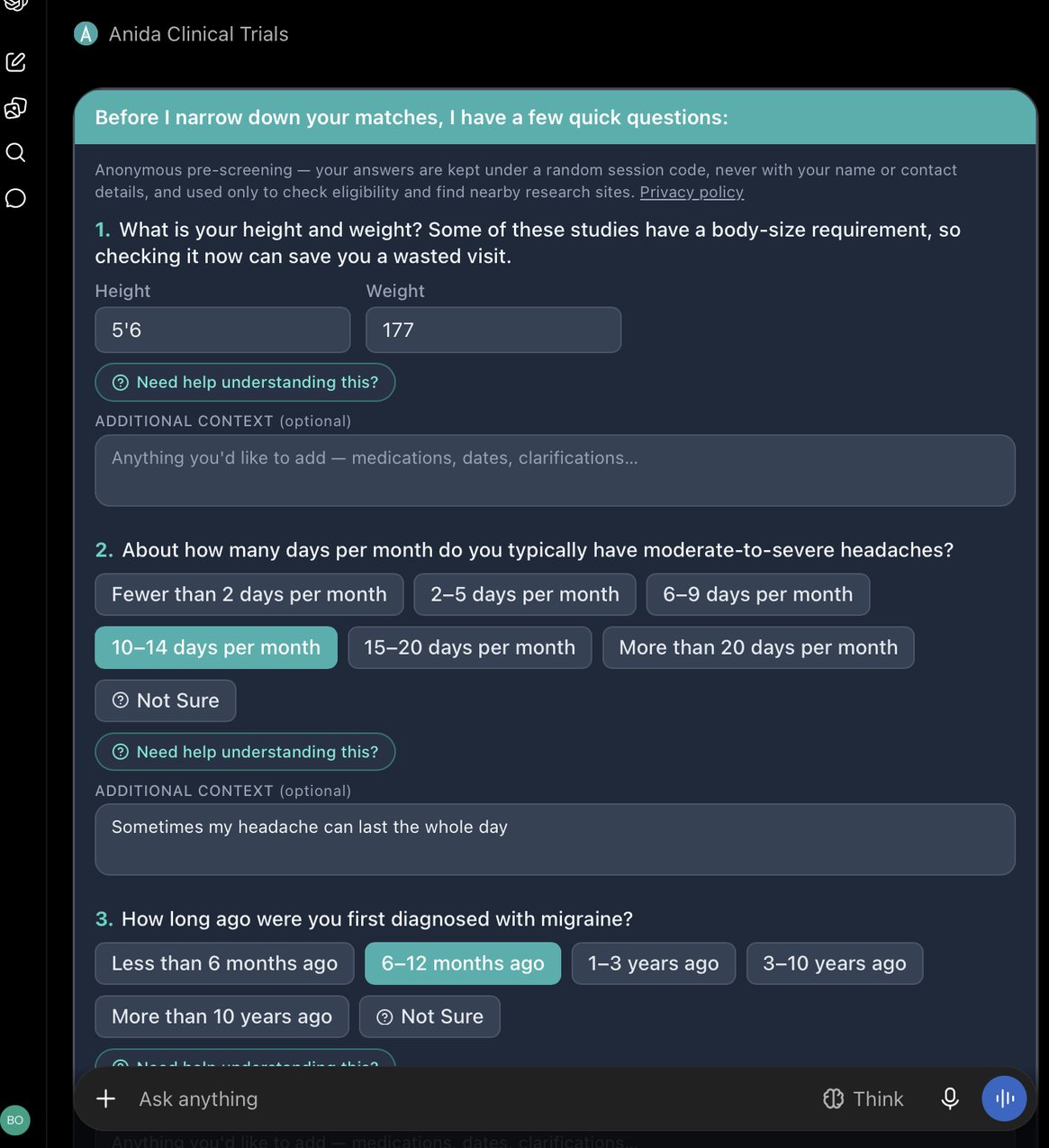
- Anida searches thousands of recruiting trials in real time for that condition and opens an interactive card right in the chat, holding pre-screening questions tailored to you and drawn from the actual criteria of the studies it found. It asks a few questions at a time and stops as soon as it has enough. For each question you can:
- Pick an answer — Yes, No, Not Sure — or one of the options shown.
- Add details in the Additional context (optional) box under the question — medications you are on, dates, or anything that clarifies your answer. Anida uses it when checking the criteria.
- Click “Need help understanding this?” under any question and Anida instantly explains what it means in plain language.
Press Submit my answers when the batch is done. Each round of results comes back in real time. How long the whole pre-screening takes depends on the condition and your health background; it is mostly under five minutes, and can be longer when more criteria need checking.
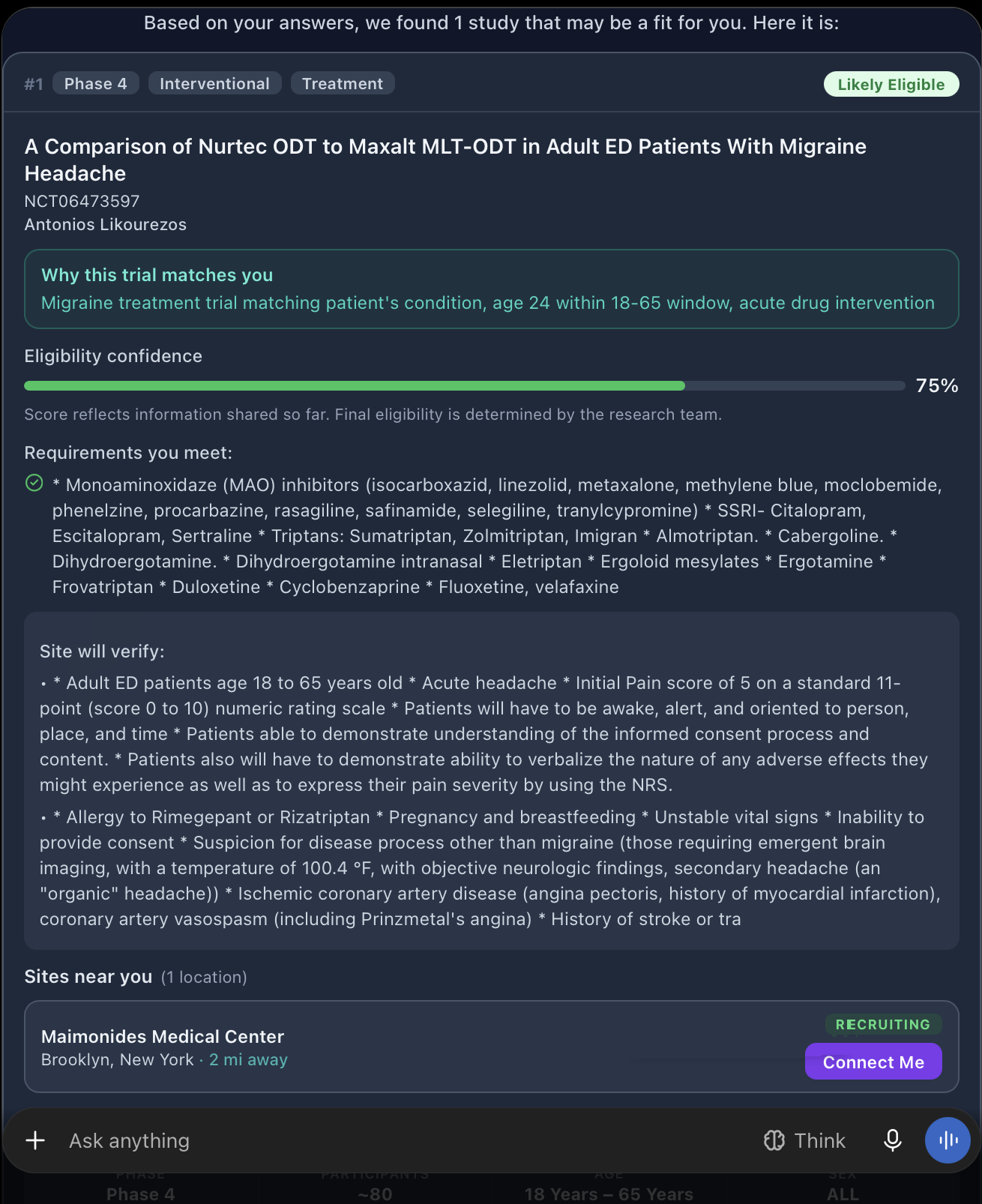
- See your best matches near you. Each study card shows the phase and study type, why this trial matches you, an eligibility confidence score based on what you have shared so far, and what the site will still verify at a visit. Every match carries one of two labels:
- Likely Eligible — your answers closely match this study’s criteria.
- Possibly Eligible — your profile partly matches; some criteria need to be verified by the research team.
Press Show full criteria on any card for a plain-language breakdown: what the study is about and its goal, the medication or intervention being tested, how the study is designed, a typical timeline of study visits, and simplified lists of who may and may not qualify. Each card also has a View on ClinicalTrials.gov link to the study’s full registry record.
- Connect with the research site. Press Connect Me on the study or site you want to learn more about. You receive a private, single-use link to AnidasoHub’s secure page. Your answers carry over, so you enter only your contact details, and we send your pre-screening directly to that research site, which follows up with you. You can connect with more than one study.
What it looks like
The same interactive card appears in both assistants. It is drawn by Anida inside the chat, so the questions, answers and results look the same wherever you use it.
Other things Anida handles
- Nothing nearby. If no recruiting study matches within your travel distance and you have not set a fixed one, Anida widens the search area before giving up.
- Still no match. Anida offers a Join the waitlist card. Through the same kind of private link, you can leave your contact details on AnidasoHub’s site to be contacted when a suitable study opens.
- A specific study. Ask about a study by its NCT number to get a plain-language description, then ask Anida to pre-screen you for that study.
- A specific site. Ask what a hospital, research center or clinic is running for a condition, then check your eligibility for the studies it lists.
- Any language. Chat in any of over 50 languages and the questions and study cards are shown in it.
Your privacy
- Pre-screening inside the assistant is anonymous. Anida never asks for — and will not accept — your name, contact details, date of birth, or street address in the chat.
- Anida does ask for your city, state and ZIP code. They are used only to find the research sites nearest you, and nothing finer than your state is kept with your pre-screening record.
- Your answers are linked to a random session code, not to you. Your assistant provider (Anthropic or OpenAI) processes the conversation under its own privacy terms, as with anything you type there.
- When you choose to connect with a study, the signup link is private, single-use and expires in 72 hours. AnidasoHub’s site is the only place your contact details are collected, and they are shared only with the research site you chose.
- Full details: AnidasoHub Privacy Policy.
Disclaimer
Anida’s pre-screening is not medical advice and is not enrollment. A match does not guarantee that you will qualify at the research site’s in-person screening or enroll in the study; the research team makes every final eligibility decision. AnidasoHub does not review the safety or science of the studies it recommends.
Inside Claude or ChatGPT, the assistant relays Anida’s questions and results; any commentary it adds is its own, not AnidasoHub’s, and your conversation is also processed by Anthropic or OpenAI under their own terms. Use of Anida is subject to AnidasoHub’s Terms and Conditions and Privacy Policy.
Support
Questions or problems with Anida Clinical Trials MCP in Claude or ChatGPT: support@anidasohub.com.
Prefer to chat with Anida here?
The same pre-screening runs on this site. Describe your condition and Anida will find what matches.
Search clinical trials